 rdark
rdarkHow to Choose a Monero Wallet
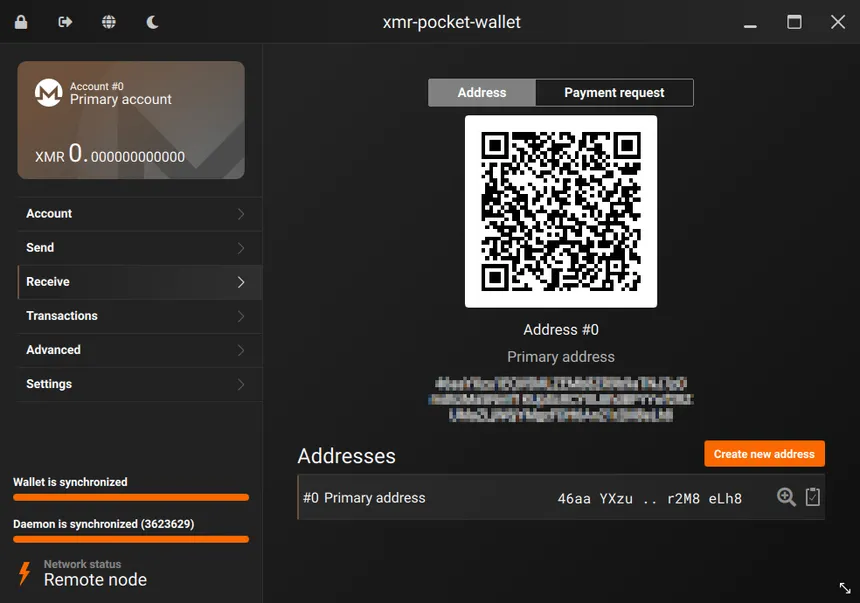
A Monero wallet is 25 words. The program on your screen is a window onto them: official GUI, Feather, Cake, a phone app, a hardware device. Lose the window and you open another. Lose the words and the coins stay on the chain, where no window can open them, including yours. Everything else on this page is about which window to open, and who else can see through it.
The windows, side by side
The Monero project's downloads page, checked in October 2026, is the list that matters. The official GUI and CLI are version 0.18.5.3, the release named Fluorine Fermi. Beside them the project lists light wallets it does not itself maintain, and it splits those into two kinds: ones that scan the chain on your device without sharing a key, and ones that hand a server your private view key so the scan can happen somewhere else. Hardware comes last, and only two brands are named.
| Wallet | Who keeps the keys | Who scans the chain | Use it when |
|---|---|---|---|
| Official GUI | You. The 25 words appear when you create it. | Simple mode uses a remote node. Advanced mode can use your own, including a pruned copy. | You want the reference window, on a desktop. |
| Official CLI | You. Same words, typed instead of clicked. | Your node or a remote one. It can also send over Tor or I2P. | You want the same project with no graphics, and a path that is not your ordinary connection. |
| Feather | You. | On your device. The project puts it in the group that shares no key with the node. | You want a lighter desktop window than the official GUI. |
| Cake Wallet / Monero.com | You. | Same group: the scan stays on your device. | You want one project the downloads page lists under two names, including on a phone. |
| Monerujo | You. | Same group. | Android, and you would rather not run the full desktop wallet. |
| Edge | You can still spend. A server holds the view key. | A remote server, continuously. | You have decided that speed is worth a server that can see your incoming coins. |
| Ledger or Trezor | The device. The backup is the device's own recovery phrase. | Whichever wallet talks to it: the official GUI or CLI, and some of the light ones. | You want the spend key off the computer that has the internet. |
The downloads page names more light wallets in the no-key-shared group: ANONERO, Monfluo, Stack Wallet, Unstoppable. A longer list is not a ranking, and this page has not tested them. The project says plainly that those light wallets are not maintained by the core team, and that you should find out for yourself whether a given one is safe. Start from the names above. Add another only after you have a reason that is not "it was first in a search."
The 25 words
When the official wallet creates a new Monero wallet, it shows a recovery seed of 25 words and then it will never show them in the same way again. Write them on paper. Put the paper somewhere that is not a photo roll, not an email draft, and not a cloud note that unlocks with the same password as your ordinary life. There is no account to recover. The Monero project does not know you created the wallet, which is the privacy, and also the reason nobody can reset it.
Those words restore the coins in a different window. A GUI that will not start, a phone at the bottom of a lake, a Feather install you deleted: none of that spends the coins. You install any wallet that speaks the same seed, type the words, and the window fills in. The inverse is just as strict. A perfect backup of the program, and no copy of the words, restores nothing.
Treat the moment the words are on screen as the whole ceremony. Read them back once. Confirm the wallet accepts them, which the official GUI asks you to do before it will go on. Then get them off the screen. A screenshot "just until I find a pen" is how a seed ends up in a camera roll that later syncs to a company's cloud.
Whose computer reads the chain
Monero's chain is large, and your wallet has to ask it a question: which of these transactions are mine? Simple mode in the official GUI answers that by connecting to a remote node, a copy of the chain someone else is running. The project's own line for that mode is almost domestic. Open the wallet, connect automatically, send and receive. You are done, and you have trusted that other computer with the fact that you asked.
Advanced mode is for when you want the copy yourself. The same GUI can prune the chain and download about a third of it, which is the project's figure for people who do not have the disk. The CLI adds a bootstrap trick: use a remote node while your own copy is still downloading, then switch when the download finishes. It can also route transactions over Tor or I2P, so the question "which coins are mine?" does not leave your ordinary IP. The CLI is the wallet that can actually use either path.
A remote node is the right default the first afternoon. It is the wrong default for a balance you cannot afford to have tied to your home connection. The node does not get your spend key from a wallet in the local-scan group. It does get your timing, and your IP, unless you put Tor between them. Match the node to the same threat you used when you bought the coins. A careful purchase into a wallet that then phones a stranger's server from your kitchen is a careful purchase with the last step undone.
A new address, the same wallet

A subaddress is a second receiving string for the wallet you already have. Coins sent to it show up under the same 25 words. It is not a new wallet, and it does not need a new backup. What it does is stop you handing the same receiving address to every exchange, every person, and every market. Monero hides amounts and counterparties on the chain. It cannot hide the fact that you pasted one address into two accounts that both know your name.
Make a fresh subaddress per counterparty. Label it in the wallet if the program lets you, so next month you remember which window it belonged to. The label stays on your computer. The other person only sees the address. When that relationship is over, you simply stop handing that address out. You do not need to sweep the coins into a new seed to retire it.
A key that watches and cannot spend
Monero splits what a key can do. The spend key moves coins. The private view key only watches: it lets a wallet find incoming transactions without being able to send them. The downloads page describes the fast light wallets in those terms. They share your private view key with a remote server, which scans all the time and tells the app what arrived. As of October 2026 the project puts a single name in that column: Edge.
These wallets share your private view key with a remote server, which continuously scans the blockchain looking for your transactions. They are faster to use, but your privacy can be lessened if you don't control the remote server.
The other group, Feather and Cake and Monerujo among them, "scan the blockchain on your device, without sharing any key with the nodes." Slower to open, because the phone or the laptop does the looking. Nobody else's server holds a key that can list your incoming coins. That sentence is the whole difference, and it is the project's, not a review score.
You can use the same split on purpose. A view-only wallet, opened from the view key in the official GUI, sits on a machine that is allowed to see the balance and is not allowed to spend. Useful for a bookkeeping screen. Dangerous if you did not notice you had handed the key to a company in exchange for a faster app. Read which column a wallet is in before you admire how quickly it shows a number.
Ledger, Trezor, and the words on the device
A hardware wallet keeps the spend key on a device that signs transactions and does not hand that key to the computer. The downloads page, in October 2026, says Monero is supported on Ledger Nano S, Nano S Plus, and Nano X, and on Trezor Model T, Safe 3, and Safe 5. The official GUI and CLI talk to both brands. Cake Wallet, Feather, and Monerujo are listed with Ledger. Feather is listed with Trezor. The same page gives a minimum firmware for each model. Check it there when you set the device up, rather than trusting a number copied into an article, including this one.
The backup is the device's own recovery phrase, the words Ledger or Trezor had you write down. Do not expect the Monero window to hand you a second, separate 25-word seed and then treat that as the real backup. If the device dies, those device words restore the keys, Monero included, into a new device. If you lose the device words, the coins are as gone as a software seed you never wrote down. The metal box is not the backup. The words that came with the box are.
How a careful wallet still fails
The chain will not leak the amount. The failures are all in the window, the paper, and the download.
- The coins never left the exchange. A balance on a swap site or a KYC exchange is a claim on their database. They can freeze it, lose it, or be told to name you. The buying guide is about how the coins are acquired. The moment they arrive, they belong in a wallet whose words you hold, and the exchange balance should be a few minutes long.
- One address for every counterparty. A subaddress is free. Reusing one receiving string across a service that knows your name and a service that must not is an off-chain link Monero's math does not break.
- The file was not the project's file. The downloads page asks you to check the archive against a signed list of hashes, and it says why in one line: a corrupted archive can lose you the funds. Some antivirus tools also flag the official executables. That warning is on the same page. A scare dialog is not a reason to go download "Monero wallet" from an ad.
- The words were stored next to the life they were meant to be separate from. A seed in a password manager that also holds your real email is a seed with your name on it. Paper, or a device whose only job is those words, is the boring option that matches the threat.
You are strongly advised to verify the hashes of the archive you downloaded. This will confirm that the files you downloaded perfectly match the files uploaded by the Monero development workgroup. Please don't underestimate this step, a corrupted archive could result in lost funds.
The signed list the page points at is hashes.txt. Check the signature against the project's key, not against a hash pasted on a forum. After the coins are in the wallet, a market payment is a different problem: the address you send to still has to be the one a signature vouches for, which is the PGP guide, and the balance you leave sitting on a market is the one an exit scam takes.
Common questions about choosing a Monero wallet
Which Monero wallet should I use on a phone?
Cake Wallet, which the Monero project lists as Cake Wallet / Monero.com, and Monerujo on Android. Both are in the group that scans the chain on your device and does not hand a key to the node. A phone wallet is a window like any other: the backup is still the recovery words, written down somewhere that is not the phone.
Can I restore a Monero wallet without the 25 words?
No. The official wallet has no support desk that can look you up. The 25 words are the wallet. A new install of the GUI, Feather, or Cake can open the same coins from those words. Without them, the coins are still on the chain and nobody, including you, can move them.
Is a remote node safe?
Safe enough for ordinary use, and it is what Simple mode in the official GUI does: it connects to someone else's copy of the chain so you do not have to download one. That computer learns that your wallet asked it questions. It does not learn your spend key if you are using a wallet that keeps its keys, which is the local-scan group on the project's downloads page. For a balance you cannot afford to have associated with your IP, run your own node, or use the CLI's option to talk to it over Tor.
Is a subaddress a new Monero wallet?
No. A subaddress is another receiving address inside the wallet you already have. Coins sent to it arrive in the same set of keys. A new wallet would mean a new set of 25 words. Use a fresh subaddress when you do not want two different people to be given the same receiving string.