 rdark
rdarkHow Tor Works, From Your Computer to an Onion Site
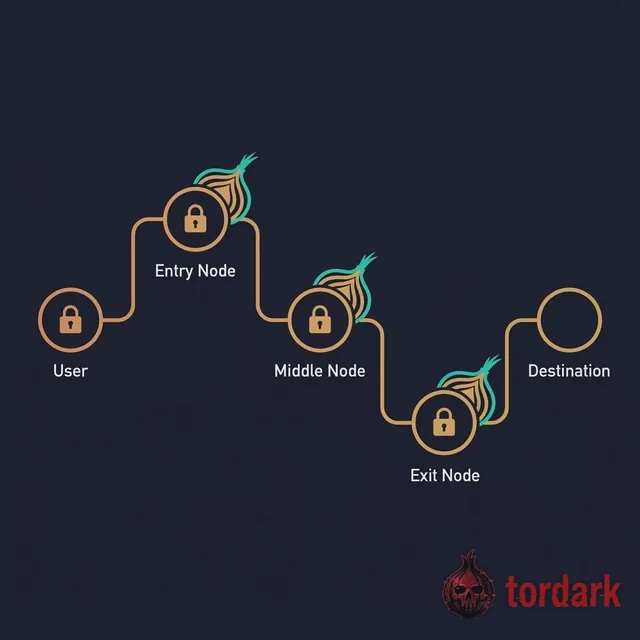
How Tor works is a short path with a strict division of labor. Your traffic passes through three volunteer computers, and no one of them can see both who you are and which site you opened. Your internet provider can see that you reached the first of those computers. They cannot see the site. An onion site never leaves the network at all, so there is no last computer handing your visit to the ordinary web. Tor hides the route. It does not hide what you type, what you download, or which account you sign in to.
One trip through three computers
Before a page loads, Tor Browser builds a path through three relays. A relay is just a computer someone volunteered, listed in a public directory the Tor Project publishes. The path is called a circuit. The Tor specification describes it as a sequence of relays, typically three, and the browser builds it one hop at a time rather than announcing the whole route up front.
Picture the page request as a note inside three envelopes. The outer envelope is addressed to the first computer, and the note inside it says only "pass the next envelope to computer two." Computer two opens its own envelope and finds "pass the next one to computer three." Computer three opens the last envelope and finds the real destination. Your home address was written on the outer envelope, which computer three never sees. The destination was written on the inner note, which computer one never opens.
The locks are real, not a metaphor stuck on top. Tor agrees a separate key with each relay, so the middle computer cannot read what the last one will open, and the last one cannot read the instructions meant for the first. The Tor Project's support page puts the result in one sentence:
Tor helps to reduce the risks of both simple and sophisticated traffic analysis by distributing your transactions over several places on the Internet, so no single point can link you to your destination.
The same page adds the mechanical half. Each relay knows only which relay gave it the data and which relay it is giving the data to. No individual relay ever knows the complete path.
A circuit is also sticky for a little while. For efficiency, Tor reuses the same circuit for connections that happen within about ten minutes, then builds a new one so later visits are harder to tie to earlier ones. Two clicks a minute apart can share a path. Two visits an hour apart should not. Advice that says Tor gives you a fresh identity on every single click is describing a different product.
Who can see what
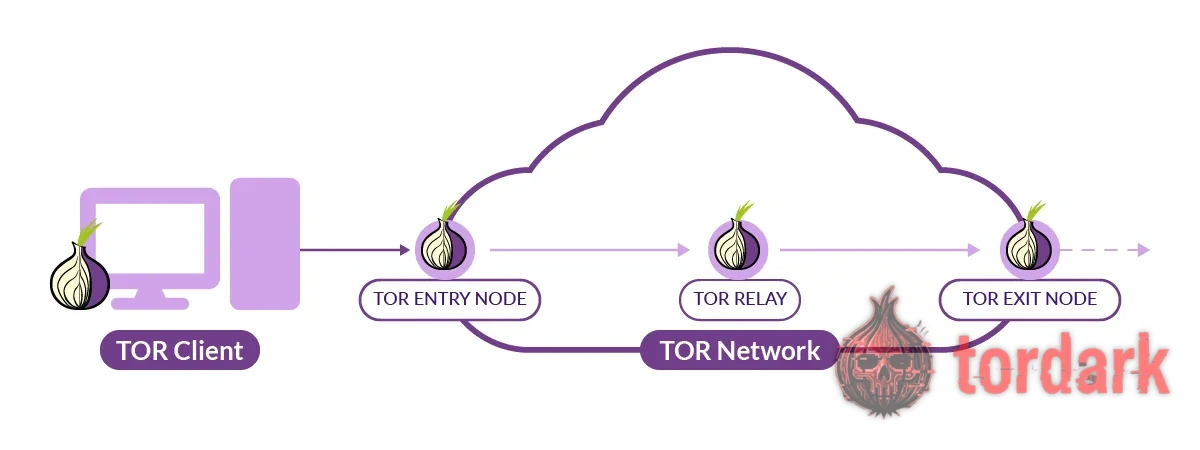
The path hides the pairing of "this person, that site." It does not make the trip invisible. Someone is always in a position to see one end of it, and the table is just that position written down. It describes a visit to an ordinary website, the kind with a normal name. Onion sites, in the next section, drop the last row's exit relay entirely.
| Who | What they can learn |
|---|---|
| Your internet provider | That you connected to a Tor relay. Not the site you opened. |
| The first relay | Your IP address, and which relay comes next. Not the site. |
| The middle relay | The relay before it and the relay after it. Neither your address nor the site. |
| The exit relay | The website, and the page itself if the site is not using HTTPS. Not your IP address. |
| The website | That a Tor exit relay visited it. Not your home IP address. |
Read the exit row twice, because it is the one people skip. The last relay is an ordinary volunteer computer, and from the website's point of view it is the visitor. If the site is plain HTTP, that relay can also read the page, the password, and the search. HTTPS closes the page from the exit relay. It does not change the rest of the table: the site still sees a Tor exit, and your provider still sees only the first hop.
Your provider's view is narrower than a normal connection and wider than the slogans. On a normal connection the provider sees the site name, through DNS and, on most of the web, through the name in the encrypted handshake. On Tor, the provider sees a connection to a relay whose address is in the public directory, so they can tell the traffic is Tor. They do not get the site name, because that name is inside the envelopes. People who need to hide the fact of Tor, not just the destination, are solving a different problem. Bridges, the unlisted front doors, are that problem, and they are already walked through in the Tor Browser setup guide.
The website's view is the mirror image. It never receives your address. It receives the exit relay's address, shared with whoever else used that exit in the same hour. That is why a site can know "this visitor is on Tor" and still have no idea which person it is, and why logging into an account with your real name throws the protection away. The site does not need your IP if you hand it the account.
An onion site never leaves
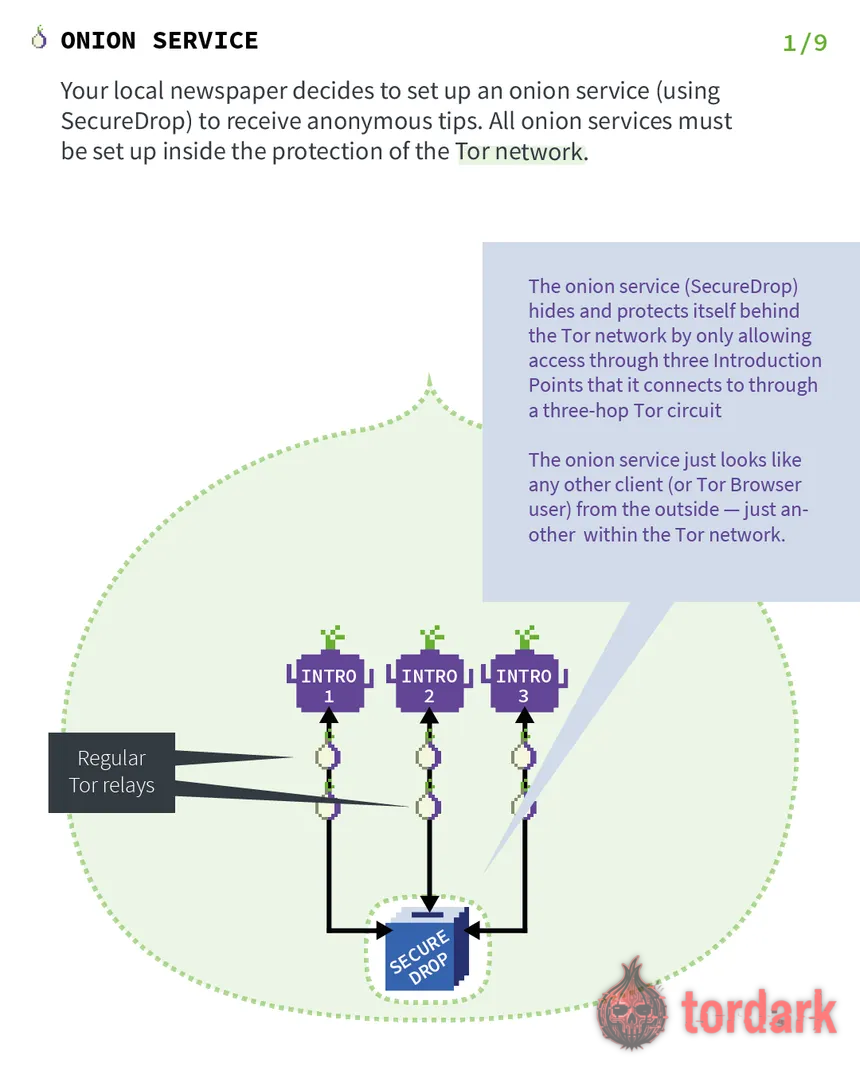
An onion site is not "a website, reached through the exit relay, whose name looks strange." The exit relay is not in the path. The Tor Project's onion-services pages say it directly: usually a Tor connection leaves the network to reach a normal destination, but with onion services the communication from one point to another stays inside the Tor network the whole time.
But with Onion Services, the communication from one point to another happens entirely inside the Tor network, all the time.
Both sides build a path, and the paths meet at a relay chosen for the meeting. You never learn the site's real address. The site never learns yours. There is no volunteer at the end who can read a careless HTTP page, because there is no end outside the network. The same pages note a side effect for the network itself: onion traffic does not have to use an exit relay, and exit relays are the scarce part of Tor.
What the site does learn is that someone using Tor reached that particular onion address, plus anything you then type into it. Encryption between you and the site is part of the meeting. It still cannot tell you the holder of that address is the operator you meant. A working onion address proves you reached the matching key. Why the string looks the way it does, why it expires, and why a page that loads can still be the wrong one, is the subject of onion addresses explained.
Why the first computer stays
The middle and the last relay change. The first one does not, at least not on every visit, and the reason is an attack rather than laziness. Tor fails when an attacker can see both ends of the same conversation: the relay you enter through, and the site you arrive at. Timing and volume are enough. They do not need to read the page.
If the browser picked a fresh first relay every time, an attacker who watches some of the relays and also watches the site would eventually win a coin flip. Sooner or later the relay you happened to enter through would be one they can see, on a visit they can also see arrive. The Tor Project's page on entry guards describes the fix: the client picks a small set of relays and uses only those for the first hop. If that set is honest, the attacker never gets both ends. If the set is already watched, they see more of your traffic, but they were going to catch you by changing doors anyway. Keeping the doors fixed is what gives you a chance of being missed.
You can see the result without a timetable. The same first hop comes back, and the rest of the path moves. That recurring hop is called a guard. Replacing it by hand, or installing a tweak whose selling point is a new entry on every visit, throws away the protection the guard exists to buy.
A bridge is a first hop of a different kind. It is a relay that is not in the public list, used when a network blocks the relays that are. A bridge replaces the front door. The three envelopes behind it do not change. When you need one, and how the browser asks for one, sits in the guide to reaching the dark web and again in the setup guide.
Where the protection ends
Tor hides the connection. It does not hide what you choose to say, download, or sign in to, and most of the damage people attribute to "Tor being broken" is one of those three. The network can be doing its job perfectly while the visit is already tied to a name.
Signing in is the common one. The website, or the onion site, receives an account. If the account was opened with a real name, a phone number, or an email you use elsewhere, the path never mattered. The first relay still does not know the site, and the site still does not know your IP, and the account number has joined them anyway. The same is true of a payment that carries your name, and of a Bitcoin transaction whose public history can be read by anyone with the time. The coin problem is why the markets that lasted moved to Monero.
A downloaded file is the second. Tor Browser can fetch it without revealing your address. The moment you open that file in a normal desktop program, the file is free to phone home over your ordinary connection, outside the three envelopes. The browser cannot escort a PDF that you chose to open somewhere else.
The browser's own disguise is the third, and it is a habit list rather than a property of the network: the window size, the extensions, the language settings you add. Tor Browser's protection there depends on looking like every other Tor Browser. The setup guide owns that list, under what the browser hides and what it does not, and it is the right place for the clicks. The point worth repeating here is only the boundary. A network that hides your route cannot repair a browser you have made unique, and it cannot repair a login.
There is a harder limit underneath, and the entry-guard page states it without softening it. If an attacker really can watch both the first relay and the site at the same time, low-latency designs like Tor do not have a reliable way to stop them matching the timing. Guards exist to make that pairing rare, not to make it impossible. Anyone who tells you Tor is either magic or useless is skipping that sentence. It is strong against an observer who sees one end. It is not a promise against an observer who sees both.
What to do with the picture
The path is the concept. Using it still starts with a browser that is actually the Tor Project's, because a modified copy can skip the path and call home directly. Download it from the project, check the signature, and set the security level, in the setup guide. The access guide is the one that asks who you are hiding from before you add anything else, a VPN included.
Once a page is open, the path has finished its job. It got you there without handing the site your address. It did not check that the address was the one you wanted. For a market, that check is a signature on a list of addresses, walked through in the PGP verification guide, and the addresses that currently pass it are the ones in the verified directory. A circuit that builds and a signature that matches are two different kinds of success. You want both, and only one of them is Tor's.
Common questions about how Tor works
Does an onion site use an exit relay?
No. An ordinary website is reached through a last relay, called an exit, which steps off Tor and opens the site for you. An onion site never takes that step. You and the site each build a path inside Tor and meet at a relay in the middle, so no volunteer computer has to hand the visit to the open web. The Tor Project's own description is that this traffic stays inside the network the whole time.
Can my internet provider see which sites I open on Tor?
It can see that you are using Tor, because the first connection is to a Tor relay, and that relay's address is public. It cannot see which site you opened. The site name sits inside encryption the provider does not have the key for. Hiding the fact of Tor itself is a different problem, handled with bridges, and it is covered in the Tor Browser setup guide.
Is using Tor legal?
In most countries, yes. Tor is published by a nonprofit, and journalists, researchers, and people getting around censorship use it every day. What the law cares about is the thing you do on the far end, such as buying controlled goods, and that is illegal on any network. Installing the browser and reading a page are not the line.
How is Tor different from a VPN?
A VPN is one company. You send them everything, they send it on, and you are trusting their promise not to keep a log. Tor is three volunteer computers in a row, and no one of them is trusted with the whole trip: the first knows who you are but not the site, and the last knows the site but not who you are. The Tor Project does not treat a VPN as a required extra. The longer answer, including the one case where a VPN is useful, is in the guide to reaching the dark web.